
As the risk and claims landscape continues to evolve, Cloud Claims is getting ahead of the challenges. Our latest releases bring a meaningful set of new capabilities across workflow automation, document handling, financial operations, and team management.
Here’s Whats New
Certificates of Insurance: Track, Report, and Stay Ahead of Expirations
CC-2683
Managing certificates of insurance has long been a manual, error-prone process — spreadsheets, calendar reminders, inbox searches. Cloud Claims now centralizes COI tracking directly within the platform. You can view current certificate status across all named insureds, run reports on coverage by carrier or expiration window, and configure pre-expiry notices that go out automatically before a COI lapses.
For risk managers overseeing large contractor or vendor pools, this closes the exposure gap. A lapsed COI discovered after a claim is already a problem. Getting the notice before expiration puts you in a position to act.
Incident Manual Events: Trigger On-Demand Claim Workflows
CC-2721
The new Incident Manual Event configuration lets claims professionals fire a defined set of workflow actions on demand. Some tasks should be triggered when you’re ready, not as a side-effect of other things happening in Cloud Claims.
A common application: sending a claim to your TPA. A human review is often necessary before firing a claim off into your TPA’s claims system. Once the review is complete, send the file with a click, on demand.
Multi-Action Workflow Rules: Do More With Each Trigger
CC-1954
Previously, a single workflow trigger could only fire a single action. That meant setting up multiple overlapping rules to handle what was really one logical event. Cloud Claims now supports triggering multiple actions from a single workflow rule.
In practice, this is a significant time-saver. When a new incident is filed, one rule can now send an email notification to the assigned handler, log a completed intake activity, add a task for the 30-day follow-up, and update the incident status all at once. This means less rule maintenance, fewer gaps, and a more consistent process from first touch to resolution.
Smarter Activity Scheduling: See Team Availability at a Glance
CC-2774
Assigning tasks without visibility into who’s already overloaded on a given day is a blind spot that can cause work to slip. The activity due date picker now shows how many other activities are already due on each date, directly in the calendar view as you’re scheduling.
Supervisors can distribute work more evenly across the team. Individual handlers can reschedule their own tasks to days where they have more realistic capacity. The result is better throughput and less firefighting at the end of the week when overdue activities pile up.
Check Printing: Disbursements Without the Detour
CC-195
Cloud Claims now supports printing claim checks directly from the platform onto your own check stock. The full disbursement workflow — reserve, approval, payment — stays inside the system. No exporting to a separate accounting tool, no manual rekey into a check-writing application.
For claims operations that handle their own payment runs, this removes a step that has historically required either a separate system or a manual workaround. Audit trail, check register, and disbursement history all remain in one place.
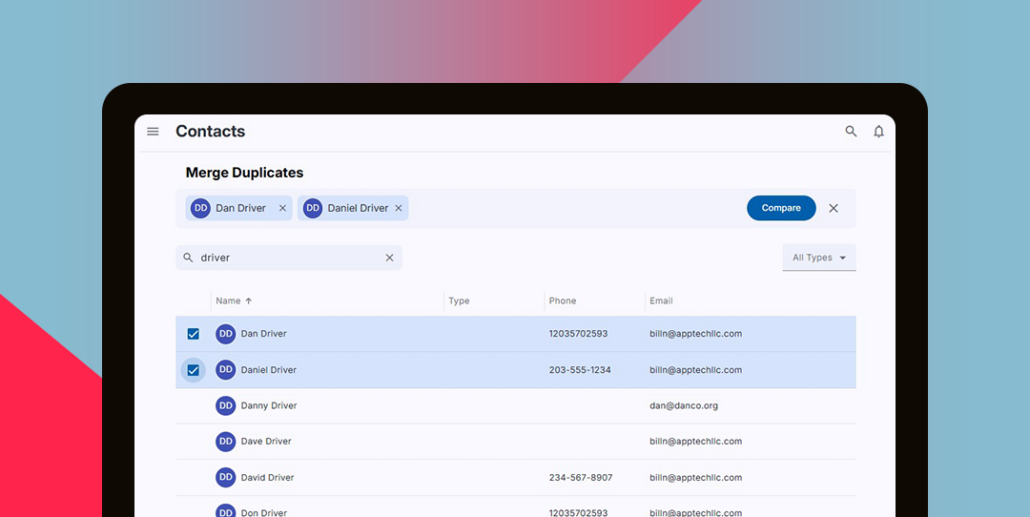
Contact Merge: Clean Up Duplicates in Seconds
CC-2704
Contact records accumulate over time — name variations, data entry differences, entries created by different staff at different points in a claim’s life. Cloud Claims now includes a contact merge function that lets you consolidate duplicate records and correct misspellings with a few clicks.
A cleaner contact database reduces confusion in reporting, prevents mis-addressed correspondence, and gives a more accurate picture of claim history when a contact appears across multiple files.
Activity Filtering, Icon Options, and Email Attachment Previews
Several enhancements improve the day-to-day experience of working within a claim:
- The incident Activity tab (CC-2501) now supports filtering by related item, so adjusters working complex claims with many stakeholders can focus on the activity thread that matters without scrolling through unrelated entries.
- Activity types now offer a broader set of icon options (CC-2190), making it easier to distinguish different task categories at a glance — useful for teams that have built out detailed activity type libraries.
- In-browser email previews (CC-2833) now display attachments, so reviewers can see the full context of a claim communication without opening the original email client.
Notification-Only Users: Email Distribution Without License Overhead
CC-2808
Not everyone who needs to receive claim-related notifications needs a full Cloud Claims user account. The new notification-only user and group configuration lets administrators set up managed email distribution lists for stakeholders outside the claims team — executives, department heads, outside counsel, or anyone who needs to stay informed without needing system access.
This closes a workaround that many teams have been managing through external email groups or manual CC lists, bringing those distributions under the same administrative control as the rest of the platform.
Taken together, this release reflects a consistent focus on the work claims teams actually do: coordinating complex workflows, managing documents and communications, overseeing disbursements, and keeping the right people informed at the right time. Each of these capabilities is live in Cloud Claims now — except where noted — and available to all users.
Questions about configuring any of these features? Reach out to the Cloud Claims support team or schedule a walkthrough with your account manager.